Cherry with Leaves: Versatile Vector Art
In the world of digital design, few motifs carry as much immediate visual weight and emotional resonance as the cherry. Paired with its accompanying foliage, this simple botanical element becomes a powerful tool for communication, decoration, and branding. The Cherry with Leaves graphic is not merely a clipart asset; it is a foundational building block for creators who need versatility without sacrificing quality. When executed correctly in a vector environment, such as Adobe Illustrator, these elements offer infinite scalability and crisp edges that raster images simply cannot match.
For designers, marketers, and hobbyists alike, understanding how to leverage high-resolution vector assets can transform a mundane project into something professional and polished. This guide explores the practical applications, technical advantages, and creative possibilities inherent in using premium cherry-themed vector graphics.
The Technical Advantage of Vector-Based Design
Before diving into creative applications, it is essential to understand why the file format matters. The assets discussed here are crafted in Adobe Illustrator, ensuring they are true vectors. Unlike pixel-based images (like standard JPEGs or PNGs taken from a camera), vector graphics use mathematical paths to define shapes. This means you can scale a Cherry with Leaves illustration from the size of a postage stamp to the side of a building without any loss of clarity or pixelation.
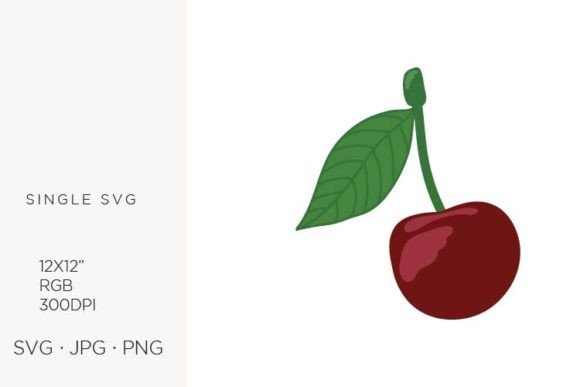
The specific technical specifications provided—12 x 12 artboard size, 300 DPI resolution, and an RGB color palette—are chosen for maximum flexibility. While RGB is primarily used for screen-based designs like web graphics and social media posts, having a high-resolution base allows for easy conversion to CMYK for print if necessary. The inclusion of multiple file formats ensures compatibility across different software ecosystems:
- SVG: Ideal for web developers and UI designers needing lightweight, scalable icons.
- EPS and AI: The industry standards for professional graphic designers using Adobe Creative Cloud or CorelDRAW, allowing for full editability of nodes and colors.
- JPG and PNG: Ready-to-use raster versions for quick drag-and-drop applications in word processors, presentation software, or basic photo editors.
This multi-format approach removes technical barriers, allowing users of all skill levels—from seasoned freelancers to small business owners creating their first invitation—to utilize the assets effectively.
Creative Applications Across Industries
The beauty of the cherry motif lies in its adaptability. It can signify sweetness, nature, romance, or even retro nostalgia depending on the context. Here is how different creators can integrate these elements into their work.
Branding and Logo Design
For boutique bakeries, juice bars, or organic skincare lines, a stylized cherry can serve as an excellent logo mark. Because the files are vector-based, you can isolate the cherry or the leaf to create minimalist icons. A clean, single-color version of the Cherry with Leaves works exceptionally well for favicon design or embroidered uniforms. Entrepreneurs should focus on simplifying the shape when using it for logos, removing intricate details to ensure legibility at small sizes.
Stationery and Event Planning
Wedding planners and stationery designers often seek motifs that balance elegance with playfulness. Cherries fit this niche perfectly. They can be used to create borders for wedding invitations, baby shower announcements, or birthday cards. By adjusting the opacity or layering the vector elements, designers can create watercolor-like effects or modern geometric patterns. The 300 DPI resolution ensures that when these designs are printed on textured cardstock or high-quality paper, the edges remain sharp and professional.
Digital Content and Web Design
Bloggers and social media managers can use these graphics to break up text, create custom headers, or design engaging Instagram stories. The SVG format is particularly valuable here, as it keeps file sizes low while maintaining crispness on high-density retina displays. You might use a cluster of cherries to highlight a "sweet deal" in an email newsletter or as a bullet point marker in a lifestyle blog post about summer recipes.
Customization Techniques for Unique Results
While pre-made clipart is convenient, true originality comes from customization. Since these files are created in Adobe Illustrator, you have full control over every anchor point and color value. Here are practical ways to make the asset your own:
- Color Palette Swapping: Don’t feel bound by traditional red and green. Try monochromatic schemes for a sophisticated look, or pastel tones for a nursery theme. Use the eyedropper tool to match the cherry colors to your existing brand guidelines.
- Shape Manipulation: Use the Direct Selection Tool to adjust the curve of the stem or the roundness of the fruit. You can elongate the leaves for a more elegant, willowy appearance or shorten them for a cute, cartoonish vibe.
- Pattern Creation: Duplicate the Cherry with Leaves element and arrange it in a grid or scatter pattern. This is ideal for creating custom wrapping paper, textile prints, or website backgrounds. Ensure you use the "Make Pattern" function in Illustrator for seamless tiling.
- Layering and Texture: Combine the vector shape with texture overlays in Photoshop. Adding a subtle grain or paper texture can give the digital vector a handmade, artisanal feel, which is highly popular in current design trends.
Best Practices for Consistency and Quality
To maintain a professional output, consistency is key. When using these graphics across multiple platforms, ensure that the style remains cohesive. If you choose a flat design style for your website, avoid switching to a highly detailed, shaded version for your business cards unless there is a strategic reason. Keep the line weights consistent if you are using outlined versions of the cherry.
Furthermore, always organize your layers. If you are editing the AI or EPS files, label your layers clearly (e.g., "Cherry Body," "Leaf," "Stem"). This practice saves time during revisions and makes it easier to toggle visibility for different design variations. For web use, always optimize your SVG code by removing unnecessary metadata to improve page load speeds.
Expanding Beyond the Obvious
Think beyond traditional paper and screens. These vector files can be sent to cutting machines like Cricut or Silhouette for physical crafts. You can create vinyl decals for laptops, wooden signs for home decor, or even jewelry molds. The precision of vector paths ensures that cutting machines follow the lines accurately, reducing material waste and improving the finish of handmade items.
Educators can also benefit from these resources. Use the clear, distinct shapes of the Cherry with Leaves for teaching materials, counting exercises, or science projects about plant life cycles. The simplicity of the design makes it accessible for young learners while remaining visually appealing.
Ultimately, the value of these digital graphics lies in their potential. They are not just static images but flexible tools waiting for your creative direction. Whether you are designing a high-end brand identity or a heartfelt handmade card, the right asset, used thoughtfully, can elevate your work from good to exceptional. By leveraging the scalability of vector formats and exploring diverse applications, you unlock a wide range of possibilities for your creative projects.