Choosing the Right Bee Clipart for Creative Projects: A Practical Guide
Integrating high-quality graphics into personal and professional projects requires more than just finding an image that looks cute. For designers, crafters, and hobbyists, Bee Clipart represents a versatile resource that bridges the gap between digital design and physical creation. Whether you are designing nursery prints, creating custom stickers, or developing web assets, understanding the technical specifications and usage rights of your chosen graphics is essential. This guide explores what makes specific bee-themed vector sets distinct, how they compare to other digital assets, and when they are the most appropriate choice for your workflow.
Understanding Vector vs. Raster in Bee Illustrations
When evaluating Bee Clipart, the first distinction to make is between vector formats (such as SVG, EPS, and AI) and raster formats (such as PNG and JPEG). Many beginners overlook this difference, leading to frustration when resizing images for large-format prints or cutting machines.
Vector graphics are composed of mathematical paths rather than pixels. This means a bee illustration saved as an SVG or EPS file can be scaled from the size of a postage stamp to a billboard without losing any clarity. For users working with cutting machines like Cricut or Silhouette, this scalability is non-negotiable. The clean lines allow the machine’s blade to follow precise paths, ensuring that intricate details—like the wings or antennae of a bee—are cut accurately.
In contrast, raster images like PNGs are made of fixed pixels. While a high-resolution PNG with a transparent background is excellent for web design or digital scrapbooking, it cannot be enlarged indefinitely without becoming pixelated. A comprehensive clipart set typically includes both. For instance, a standard package might offer layered SVGs for cutting and high-resolution PNGs for immediate drag-and-drop use in digital documents. Understanding which format serves your specific medium is the first step in efficient project planning.
The Value of Layered Designs for Customization
Not all clipart is created equal. Basic illustrations often come as a single, flat layer, which limits creative flexibility. However, premium Bee Clipart sets frequently feature designs that are "layered by color." This technical detail significantly expands the utility of the asset.
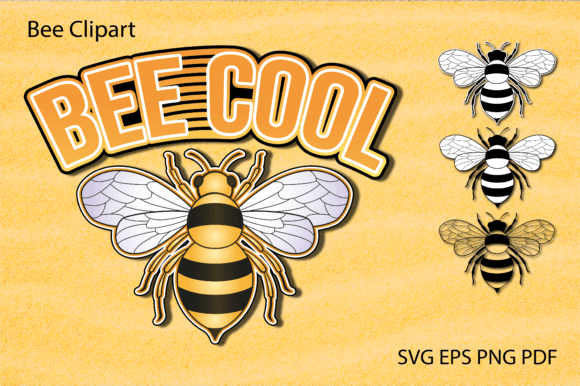
Layered files allow users to separate different elements of the illustration. For example, in a design featuring the text "Bee Cool," a layered SVG enables you to change the color of the text independently from the bee illustration. You might choose to make the bee yellow and black while keeping the text in a soft pastel blue for a nursery theme. Without layers, you would need complex editing software to isolate these elements manually, a process that is time-consuming and often imperfect.
This feature is particularly valuable for those using software like Adobe Illustrator, CorelDRAW, or even free alternatives like Inkscape. It also enhances compatibility with user-friendly platforms like Cricut Design Space, where layered uploads simplify the process of assigning different material types or colors to specific parts of the design. When comparing options, prioritize sets that explicitly mention layered structures if you intend to customize colors or materials.
Compatibility Across Software and Hardware
One of the most common pitfalls in purchasing digital assets is assuming universal compatibility. Before downloading any Bee Clipart, it is crucial to verify that the provided file formats align with your existing tools. A robust digital download package usually includes a variety of formats to cover different use cases:
- SVG: Ideal for web design and cutting machines like Cricut Explore and Silhouette Designer Edition. These files are lightweight and scalable.
- EPS and AI: Standard formats for professional graphic design software such as Adobe Illustrator. These are best for users who need to edit anchor points or integrate the bee graphics into larger branding packages.
- PNG: Best for quick integration into word processors, presentation slides, or social media graphics. Look for files with transparent backgrounds to avoid unsightly white boxes around the image.
- PDF: Useful for direct printing. However, users must be cautious with print settings.
When using PDF files for physical prints, such as party invitations or wall art, always adjust your printer settings to "Actual Size" or "100% scale." Selecting "Fit to Page" can alter the dimensions, potentially causing the artwork to shrink or distort, which defeats the purpose of using a precision-designed artboard, typically sized at 20x20 inches for maximum versatility.
Comparing Use Cases: When to Choose Bee Clipart
Deciding whether a specific clipart set fits your needs depends largely on the end product. Here is a practical comparison of common scenarios:
Digital Scrapbooking and Web Design
For digital-only projects, ease of use is paramount. PNG files with transparent backgrounds are the gold standard here. They can be dragged directly into Canva, Photoshop, or blog editors without additional processing. If your primary goal is creating digital invitations or social media posts, ensure the clipart set offers high-resolution PNGs (at least 300 DPI) to maintain crispness on retina displays.
Physical Crafts and Cutting Machines
If you own a cutting machine, SVG files are indispensable. The "Bee Cool" text examples mentioned in many listings are specifically optimized for this purpose. The layered nature of these files allows for multi-material projects—for instance, cutting the bee out of vinyl and the text out of cardstock. Always check that the SVG paths are closed and clean; poorly constructed vectors can cause cutting errors.
Professional Printing and Merchandise
For items like t-shirts, mugs, or large posters, vector formats (EPS/AI) are superior. They ensure that edges remain sharp regardless of the print size. If you are sending files to a professional print shop, they will often request EPS or PDF files in CMYK color mode. Some clipart sets include CMYK-ready PDFs, which is a significant advantage over RGB-only digital files, as it ensures the colors you see on screen match the printed output more closely.
Evaluating Quality and Artistic Style
Beyond technical specifications, the artistic style of Bee Clipart plays a major role in its suitability. Bee illustrations can range from hyper-realistic botanical drawings to whimsical, cartoonish characters. When selecting a set, consider the tone of your project.
For educational materials or scientific blogs, a more realistic style may be appropriate. For children’s parties, nursery decor, or playful stickers, a stylized, friendly aesthetic with bold lines and bright colors works better. The "Bee Cool" concept suggests a playful, modern vibe, which is ideal for casual projects but may not suit formal corporate branding.
Additionally, examine the complexity of the design. Highly detailed illustrations look beautiful on screen but can be difficult to cut with small blades or print on small stickers. Simpler designs with clear separation between elements are often more versatile for DIY crafts.
Making an Informed Decision
Choosing the right Bee Clipart involves balancing technical compatibility with artistic intent. Before purchasing, ask yourself three questions:
- What is my primary output? If it is physical cutting, prioritize SVG/EPS. If it is digital, prioritize PNG.
- Do I need to customize colors? If yes, ensure the files are layered by color.
- Is the license appropriate? Most digital downloads are for personal or small commercial use. Verify the terms if you plan to sell products made with these graphics.
By focusing on these factors, you can avoid the common frustrations of incompatible files or low-resolution images. A well-curated set of bee illustrations, complete with vector and raster options, offers a flexible foundation for a wide array of creative endeavors. Whether you are a seasoned designer using Adobe Suite or a hobbyist exploring Cricut Design Space, the right clipart set streamlines your workflow and enhances the final quality of your projects.
Ultimately, the value of Bee Clipart lies in its adaptability. It serves not just as a decorative element, but as a functional tool that can be manipulated, resized, and repurposed across multiple mediums. Taking the time to understand the file formats and design structures ensures that you get the most out of your digital purchase, turning simple graphics into polished, professional-looking creations.